How to deploy your custom website for FREE
The short version
One GitHub repo, one Cloudflare project, zero deployment scripts. That is the entire pipeline, and it has never let me down.
I have deployed sites on more platforms than I care to admit. Netlify, Vercel, shared hosting. All of that is behind me now. Every site I build, client work or personal, ships through Cloudflare Pages. It is the simplest, cheapest, and most reliable deployment pipeline I have used, and I am not going back.
I build my sites with Astro.js. I will be writing a separate piece on why Astro.js is better than the rest and how to build a custom site with it. But the framework is only half the equation. The other half is getting it live, keeping it live, and not bleeding money in the process.
If your deployment pipeline has more steps than your morning coffee routine, you have over-engineered it.
The setup takes ten minutes
The whole thing works like this. You buy your domain on Cloudflare. You create a GitHub repository for your project. You connect that repo to Cloudflare Pages. Done. Every push to main triggers a build and deploys your site automatically. No CI config files, no deploy scripts, no webhooks to maintain.
# That is genuinely the entire deployment process
git add .
git commit -m "update landing page copy"
git push origin main
# Cloudflare picks it up, builds it, deploys it.
# Go get coffee.
The build logs show up in your Cloudflare dashboard. If something breaks, you see it immediately. If it passes, your site is live within seconds. I have shipped hundreds of updates this way and the only time it failed was when I pushed broken code, which is not Cloudflare’s problem.
You do not need to buy a domain to start
This is something I wish I knew earlier. If you are not ready to commit to a domain, or you are prototyping something, Cloudflare gives you a free subdomain at yourproject.pages.dev. It is not some temporary staging URL that expires. It is a real, permanent address with HTTPS. I have seen people use .pages.dev subdomains for portfolios, side projects, even internal tools. It just works.
When you are ready to go custom, buy the domain through Cloudflare and connect it. The DNS is already managed in the same place, so there is no third-party nameserver dance. Two clicks and your custom domain points to the same Pages project.
Cloudflare has the best domain prices and it is not close
I have always felt this, and the numbers back it up. Cloudflare sells domains at cost. No markup. A .com on Cloudflare is the wholesale price from the registry. Compare that to the domain registrars with names that sound like a bad daddy joke. You know the ones. The ones where a domain is $2.99 for the first year and $19.99 on renewal, and somewhere between checkout and confirmation they have tried to sell you five add-ons you did not ask for.
No micro-transactions. That is the part that keeps me loyal. Cloudflare does not upsell you on “premium DNS” or “domain privacy” or “SSL certificates” because all of that is already included. You pay for the domain. You get the domain. You also get DNS, HTTPS, DDoS protection, and a CDN. On those other registrars, each of those is a separate line item.
The analytics are genuinely useful
Cloudflare gives you traffic analytics out of the box. Not the bloated, cookie-dependent kind. Server-side analytics that show you real requests, unique visitors, bandwidth, and threats blocked. I check mine maybe once a week. It tells me where traffic is coming from, which pages get hit the most, and whether anything suspicious is happening.
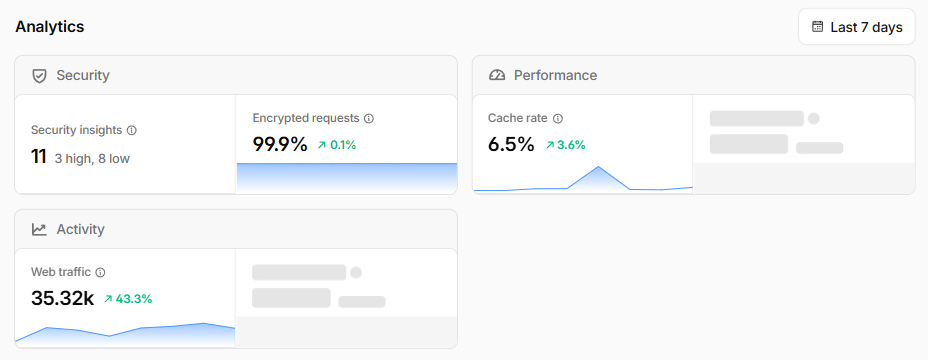
For a personal site or a small client project, this is more than enough. You do not need a separate Google Analytics script loading on every page, slowing things down and throwing consent banners at visitors. Cloudflare’s numbers are already there, already accurate, and already free.
The .sg problem and how I worked around it
For my Singapore friends, here is the one real downside. Cloudflare does not sell .sg or .com.sg domains. If you need one, you cannot buy it through them directly.
I ran into this with a few client projects when I was running my agency. The clients needed .com.sg domains for local credibility. So I bought the domains from a local registrar and pointed the DNS records to Cloudflare. You update the nameservers on the registrar’s side to Cloudflare’s, and from that point on, Cloudflare handles everything. The domain lives elsewhere on paper, but the DNS, the CDN, the SSL, the deployment, all of it runs through Cloudflare Pages.
It adds one extra step to the initial setup. After that, you never touch the external registrar again.
Stop paying for things that should be free
The deployment landscape is full of platforms that charge you for features Cloudflare bundles in by default. Custom domains, HTTPS, build minutes, bandwidth. On some platforms, you hit a free tier limit and suddenly your hobby project costs $20 a month. On Cloudflare Pages, the free tier is generous enough that most personal sites and small client projects never outgrow it.
If you are still deploying by dragging a folder into a hosting panel, or running scp to a VPS, or paying a registrar with a name that makes you cringe every time you type it into your browser, switch. Set up a GitHub repo, connect it to Cloudflare Pages, push to main, and let the pipeline do what pipelines are supposed to do. Deploy your code and get out of the way.